Navigation

8/19/2014

Applescript: lpadmin command to set duplexing

Wanted to use LPADMIN command to turn on duplexing when I installed printers, I am using Generic PCL printer driver, version 1.3


First use this command to get options:
lpoptions -p printer_name -l
 
This returned:
 
PageSize/Media Size: *Letter Legal Executive Tabloid A3 A4 A5 B5 EnvISOB5 Env10 EnvC5 EnvDL EnvMonarch
Resolution/Resolution: *300dpi 600dpi
InputSlot/Media Source: *Default Tray1 Tray2 Tray3 Tray4 Manual Envelope
Duplex/2-Sided Printing: *None DuplexNoTumble DuplexTumble
Option1/Duplexer: *False True
 
 
So need to add this to lpadmin commandline:
-o Duplex=DuplexTumble -o Option1=True 
 
Full statement is:
do shell script "/usr/sbin/lpadmin  -L 2nd-floor-library    
 -o printer-is-shared=false  -o Duplex=DuplexTumble -o Option1=True 
 -p  '2nd-floor-library' -v smb://testserver.someplace.edu/LAW228_HP600 -P   
 " & quoted form of (POSIX path of myFile) as text & "  " 


This does not make double sided printing the default, rather it makes sure the option is not grayed out, and that 2 sided printing can be selected.

8/18/2014

Credential Manager in French: Gestionnaire d’informations

Helping a french student with a Windows laptop, was trying to find the "Credential Manager" via a search, it turns out it is called:

Gestionnaire d’informations


From MS Website   

8/17/2014

Appending text to every cell in Excel spreadsheet

I needed to add same text to the end of every cell in one column:


  • All your data is in column A (beginning at row 1).
  • In column B, row 1, enter =A1&"THIS_TEXT_APPENDED"
  • This will make cell B1 equal A1 with THIS_TEXT_APPENDED
  • Now select cell B1 and drag from the bottom right of cell down through all your rows (this copies the formula and uses the corresponding column A value.

http://stackoverflow.com/questions/3179513/how-to-append-same-text-in-every-cell-in-ms-excel

8/04/2014

Listing users on windows shared drive

Ran out of "connections" to a windows file share, logged into server and did the following:


To disconnect a user or all users from a shared folder or drive by using the Windows interface
  1. Open Computer Management.
  2. If the User Account Control dialog box appears, confirm that the action it displays is what you want, and then click Yes.
  3. In the console tree, click System Tools, click Shared Folders, and then click Sessions.
  4. To disconnect all users, on the Action menu, click Disconnect all users. To disconnect a specific user, in the Details pane right-click the user name, and then click Close Session.


To disconnect a user or all users from a shared folder or drive by using a command line
  1. To open an elevated Command Prompt window, click Start, point to All Programs, click Accessories, right-click Command Prompt, and then click Run as administrator.
  2. If the User Account Control dialog box appears, confirm that the action it displays is what you want, and then click Yes.
  3. Type:
    net session \\<computer> /delete
    
    For example, to disconnect a user on a computer named user_computer, which is connected to a shared folder that you are managing, type:
    net session \\user_computer /delete

From: MS Technet

7/24/2014

Format date with javascript

Looking to format date in standard   mm/dd/yyyy


var d = new Date();

var month = d.getMonth()+1;
var day = d.getDate();
var hour = d.getHours();
var minute = d.getMinutes();
var second = d.getSeconds();

var output = d.getFullYear() + '-' +
    ((''+month).length<2 ? '0' : '') + month + '-' +
    ((''+day).length<2 ? '0' : '') + day + ' ' +
    ((''+hour).length<2 ? '0' :'') + hour + ':' +
    ((''+minute).length<2 ? '0' :'') + minute + ':' +
    ((''+second).length<2 ? '0' :'') + second;

See this jsfiddle for a proof: http://jsfiddle.net/nCE9u/3/
You can also enclose it within function (demo is here: http://jsfiddle.net/nCE9u/4/):
 
function getISODateTime(d){
    // padding function
    var s = function(a,b){return(1e15+a+"").slice(-b)};

    // default date parameter
    if (typeof d === 'undefined'){
        d = new Date();
    };

    // return ISO datetime
    return d.getFullYear() + '-' +
        s(d.getMonth()+1,2) + '-' +
        s(d.getDate(),2) + ' ' +
        s(d.getHours(),2) + ':' +
        s(d.getMinutes(),2) + ':' +
        s(d.getSeconds(),2);
}

and use it like that:
 
getISODateTime(new Date());

or:
getISODateTime(some_other_date);

This question is a duplicate (see: How to get current date in jquery?).


http://stackoverflow.com/questions/9050763/format-date-in-jquery

7/16/2014

Group in Outlook contacts - easy way

Wanted to create a group in my outlook contacts with a list of emails from a message.  (from MSoutlook.info)


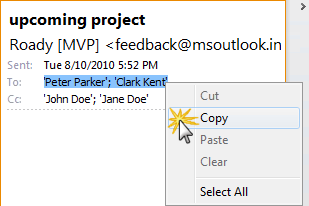
  1. Right click on a recipient in the message header in the Reading Pane.
  2. From the context menu that pops-up, choose; Select All
  3. Now that all the recipients are highlighted, press CTRL+C to copy them or right click on the selected addresses and choose Copy.
  4. Open your Contact Group or create a new one via;
    New Items-> More Items-> Contact Group
    (or use the keyboard shortcut CTRL+SHIFT+L) 
  5. Give the Group a name.
  6. Press the “Add Members” button and select “From Address Book”.
  7. Place your cursor in the field next to the “Members->” button.
  8. Press CTRL+V to paste the copied addresses. [separated by semi colons ;;;] 
  9. Press OK and the addresses will be added to the Contact Group. 

Select and copy addresses from message


When paste email addresses, separate by semi colons (cat@aaa.com; dog@aaa.com; frog@aaa.com)


Outlook 2010